3.4.3.2. GOES
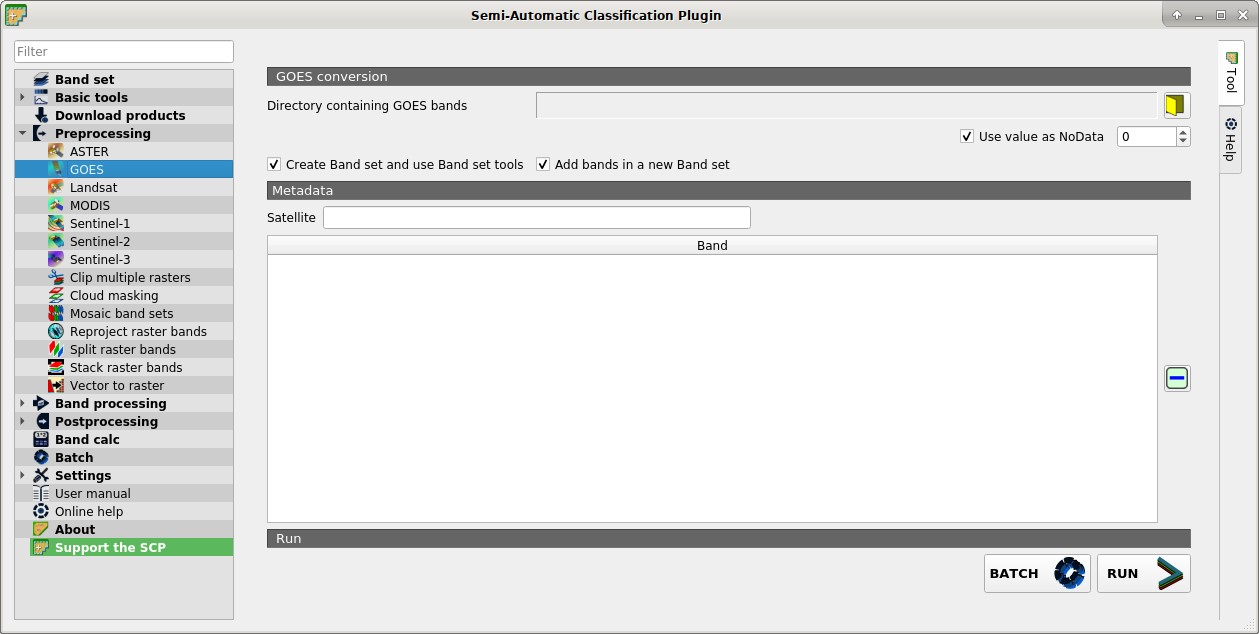
 GOES
GOES
This tab allows for the conversion of GOES images provided in netCDF4 (.nc) format inside a directory.
3.4.3.2.1. GOES conversion
- Directory containing GOES bands
 : open a directory containing GOES bands; names of bands must end with the corresponding number;
  Use value as NoData
  : if checked, pixels having
 NoDatavalue are not counted during conversion; it is useful when image has a black border (usually pixel value = 0);- Create Band set and use Band set tools: if checked, bands are added to the active Band set after the conversion; also, the Band set is processed according to the tools checked in the Band set;
- Add bands in a new Band set: if checked, bands are added to a new empty Band set after the conversion;
3.4.3.2.2. Metadata
All the bands found in the Directory containing GOES bands are listed in the table Metadata.
- Satellite
 : satellite name (e.g. GOES);
  : remove highlighted bands from the table Metadata;
 : table containing the following fields;
- Band: band name;
- BATCH
 : add this function to the Batch;
 - RUN
 : select an output directory and start the conversion process; only bands listed in the table Metadata are converted; converted bands are saved in the output directory with the prefix
 RT_and automatically loaded in QGIS;