5. LCS threshold
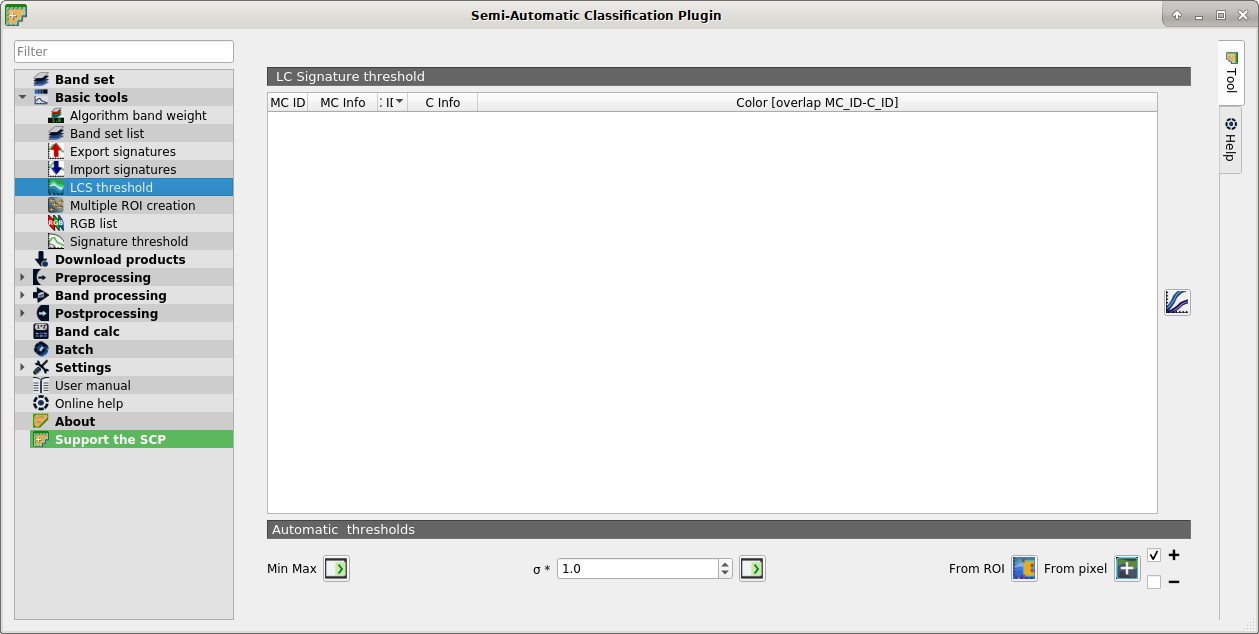
 LCS threshold
This tab allows for setting the signature thresholds used by Land Cover Signature Classification. All the signatures contained in the Training input are listed; also, signature thresholds are saved in the Training input.
Overlapping signatures (belonging to different classes or macroclasses) are highlighted in orange in the table LC Signature threshold; the overlapping check is performed considering MC ID or C ID according to the setting Use  MC ID C ID in Algorithm.
Overlapping signatures sharing the same ID are not highlighted.
MC ID C ID in Algorithm.
Overlapping signatures sharing the same ID are not highlighted.
5.1. LC Signature threshold
 LC Signature threshold: table containing the following fields;
- MC ID: signature Macroclass ID;
- MC Name: signature Macroclass Name;
- C ID: signature Class ID;
- C Name: signature Class Name;
- Color [overlap MC_ID-C_ID]: signature color; also, the combination MC ID-C ID is displayed in case of overlap with other signatures (see Land Cover Signature Classification);
- Min B
X: minimum value of bandX; this value can be edited; - Max B
X: maximum value of bandX; this value can be edited;
 : show the ROI spectral signature in the Spectral Signature Plot; spectral signature is calculated from the Band set;
5.2. Automatic thresholds
Set thresholds automatically for highlighted signatures in the table LC Signature threshold; if no signature is highlighted, then the threshold is applied to all the signatures.
- Min Max
 : set the threshold based on the minimum and maximum of each band;
 - σ *
 : set an automatic threshold calculated as (band value + (σ * v)), where σ is the standard deviation of each band and v is the defined value;
 - From ROI
 : set the threshold using the temporary ROI pixel values, according to the following checkboxes:
 - +: if checked, signature threshold is extended to include pixel signature;
- –: if checked, signature threshold is reduced to exclude pixel signature;
- From ROI
- From pixel
 : set the threshold by clicking on a pixel, according to the following checkboxes:
 - +: if checked, signature threshold is extended to include pixel signature;
- –: if checked, signature threshold is reduced to exclude pixel signature;
- From pixel