3.4.9.3. Processing setting (complete interface)
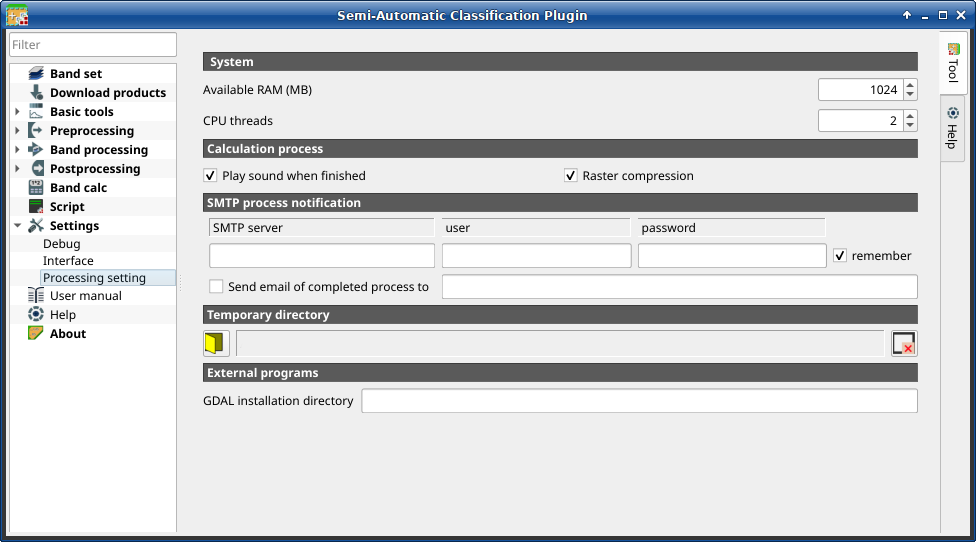
Processing
It is loaded only if the Simplified interface is not enabled.
3.4.9.3.1. System
Tool symbol and name |
Description |
|---|---|
Available RAM (MB) |
set the available RAM (in MB) that is used during the processes in order to improve the SCP performance; this value should be half of the system RAM (e.g. 2048MB if system has 4GB of RAM) |
CPU threads |
set the number of threads available for processing; it is recommended to set a value lower than the maximum number of system threads (e.g. if the system has 4 available threads set the value 3) |


3.4.9.3.2. Calculation process
Tool symbol and name |
Description |
|---|---|
|
if checked, play a sound when the process is completed |
|
if checked, a lossless compression (DEFLATE or PACKBITS) is applied to raster outputs in order to save disk space; it is recommended to check this option to save disk space, or uncheck to faster the calculation |
3.4.9.3.3. SMTP process notification
Tool symbol and name |
Description |
|---|---|
SMTP server |
the SMTP server to login for sending a notification email when all the SCP processes are finished (a notification is sent also in case of error, but not in case of crash) |
user |
the SMTP server user |
password |
the SMTP server password |
Send email of completed process to |
a list of addresses (separated by comma) to send the notification email to |

Предупреждение
If  remember is checked, the password is stored
unencrypted in QGIS registry.
remember is checked, the password is stored
unencrypted in QGIS registry.
3.4.9.3.4. Temporary directory
Tool symbol and name |
Description |
|---|---|
|
select a new temporary directory where temporary files are saved during the processing; the path to the current temporary directory is displayed; default is a system temporary directory |
|
reset to default temporary directory |


3.4.9.3.5. External programs
This option is deprecated. Some tools require external programs to perform the processing.
Tool symbol and name |
Description |
|---|---|
GDAL installation directory |
enter the path to the GDAL directory containing tools such as
gdal_translate and gdalwarp (e.g. |
