3.4.4.5. Reproject raster bands (complete interface)
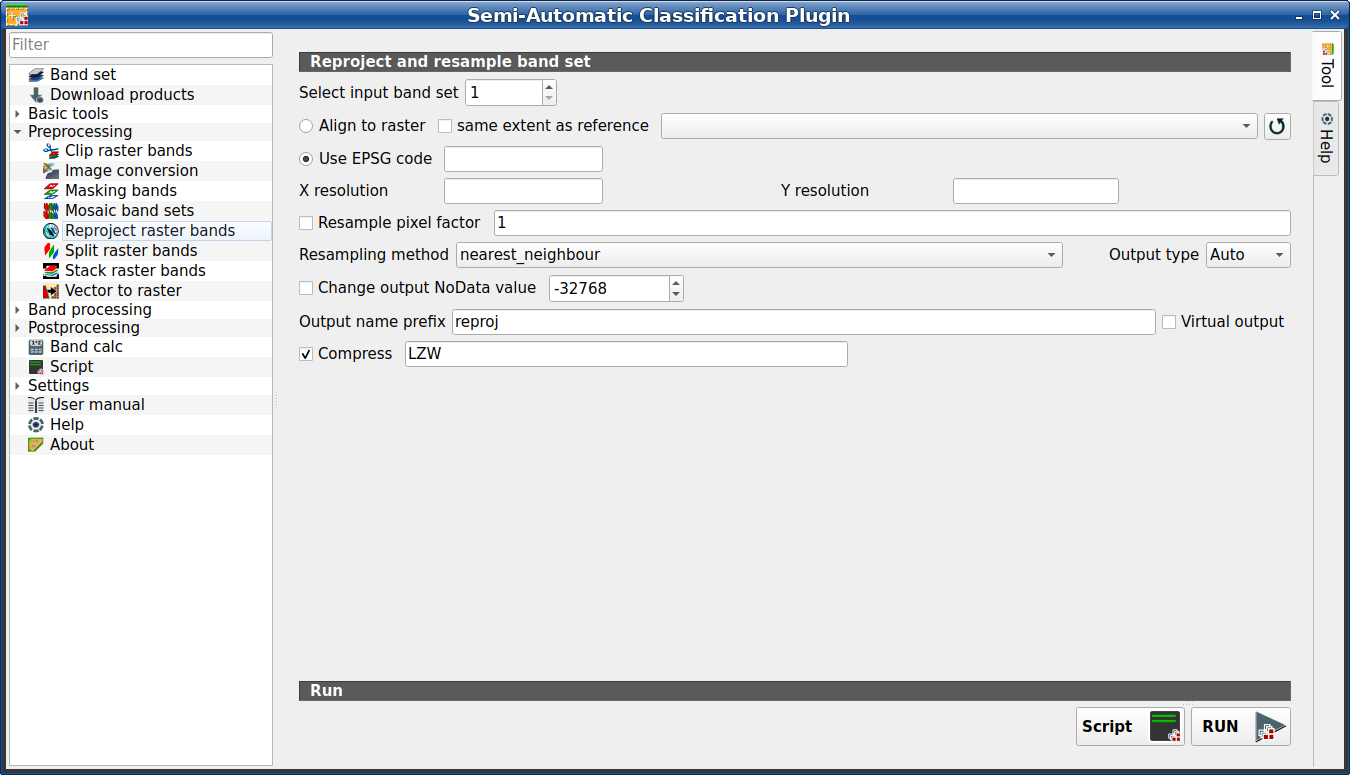
Reproject raster bands
This tab allows for reprojecting bands in a Band set (complete interface) and perform other raster operations. It is loaded only if the Simplified interface is not enabled.
Tip
Information about APIs of this tool in Remotior Sensus at this link .
3.4.4.5.1. Reproject raster bands
Tool symbol and name |
Description |
|---|---|
Select input band set |
select the input Band set (complete interface) to be reprojected |
|
if checked, use the same coordinate reference system and pixel size as the selected reference |
|
if checked, the output extent will be the same as the reference |
|
refresh layer list |
|
if checked, use the EPSG code for defining the output coordinate reference system |
X resolution |
set X pixel resolution |
Y resolution |
set Y pixel resolution |
|
if checked, new pixel size will be the original size times this factor |
Resampling method |
select the resampling method; options are: |
Output type |
select the output raster type; options are: |
|
if checked, set a new value for |
Output name prefix |
set the prefix for output file names (default is |
Compress |
if checked, set the compression method (e.g., LZW, DEFLATE) |
Script |
add this function to the Script (complete interface) |
RUN |
run this function |


