3.4.5.2. Clustering
Clustering
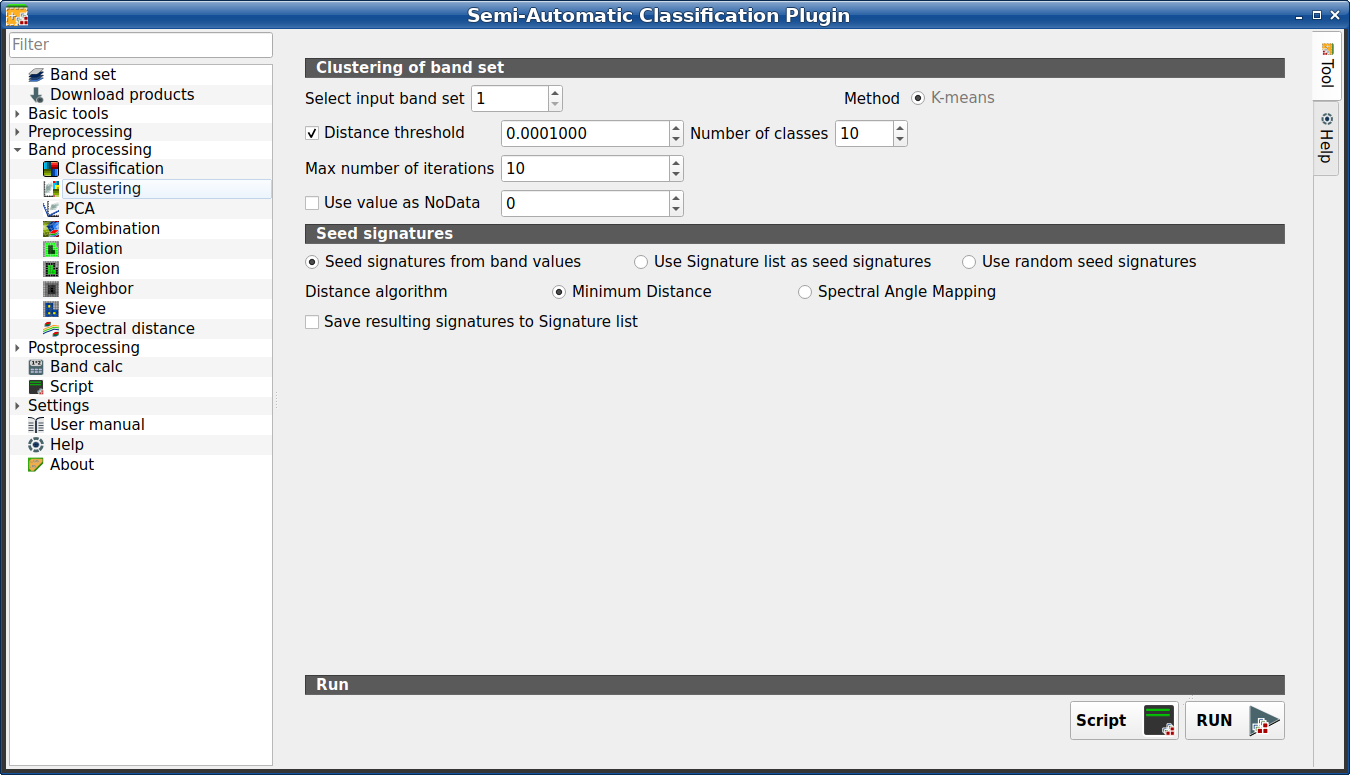
This tab allows for the Clustering of a Band set (complete interface). In particular, K-means method is available.
The spectral signatures are saved along with the classification, and can be saved in the Training input.
Tip
Information about APIs of this tool in Remotior Sensus at this link .
3.4.5.2.1. Clustering of band set
Tool symbol and name |
Description |
|---|---|
Select input band set |
select the input Band set (complete interface) |
Method |
select the clustering method K-means |
|
if checked, K-means iteration is terminated if distance is lower than threshold |
Number of classes |
number of desired output classes |
Max number of iterations |
maximum number of iterations if Distance threshold is not reached |
|
if checked, set the value of |


3.4.5.2.2. Seed signatures
Tool symbol and name |
Description |
|---|---|
|
select one options for seed signatures that start the iteration; the option Seed signatures from band values divides the spectral space of the Band set (complete interface) to get spectral signatures; the option Use Signature list as seed signatures uses the spectral signatures checked in ROI & Signature list; the option Use random seed signatures randomly selects the spectral signatures of pixels in the Band set (complete interface) |
Distance algorithm |
select Minimum Distance or Spectral Angle Mapping for spectral distance calculation |
|
if checked, save the resulting spectral signatures in the ROI & Signature list |
Script |
add this function to the Script (complete interface) |
RUN |
run this function |

